Step-by-step guide
How to Print Cheques Perfectly Every Time
Printing cheques from your browser is easy — but it requires a few specific settings to ensure the text lands exactly on the printed lines. Follow this guide for millimeter-perfect alignment on your very first try.
Our precision print engine is strictly calibrated for Google Chrome on a desktop computer.
- Do not use Safari, Firefox, or Edge — they handle printer margins differently and will cause misalignments.
- Do not print from a mobile phone.
Before typing any names or amounts, tell the tool what kind of cheque you are holding.
- Select Your Region: Choose India, USA, UK, or Other Countries.
- Select Your Bank (India): Pick your specific bank from the dropdown (e.g., ICICI, HDFC, SBI). The tool automatically loads the exact mm coordinates for that bank.
- Custom Dimensions (Global): Measure your physical cheque with a ruler and enter the Width and Height in millimeters.
Fill out the required fields. The live preview shows exactly how the final print will look.
- Smart Amounts: The tool automatically generates the “Amount in Words.” Long amounts wrap to a second line with a precise 6mm gap.
- A/C Payee: Toggle the “A/C PAYEE” label on or off for Indian cheques. This feature is disabled for non-Indian regions.
Before risking a real bank cheque, always do a test run first.
- Take a standard blank piece of A4 paper.
- Click the Print Cheque button.
- Place the printed A4 paper over your real blank cheque.
- Hold both up to a bright light or a window — you will instantly see if the text aligns with the printed lines.
When the Chrome print window appears, verify these settings carefully:
| Setting | Required Value |
|---|---|
| Paper Size | A4 |
| Scale | Default or 100% — never “Fit to Page” |
| Margins | None or Minimum |
| Headers & Footers | Uncheck — prevents the browser from printing the date and URL on your cheque |
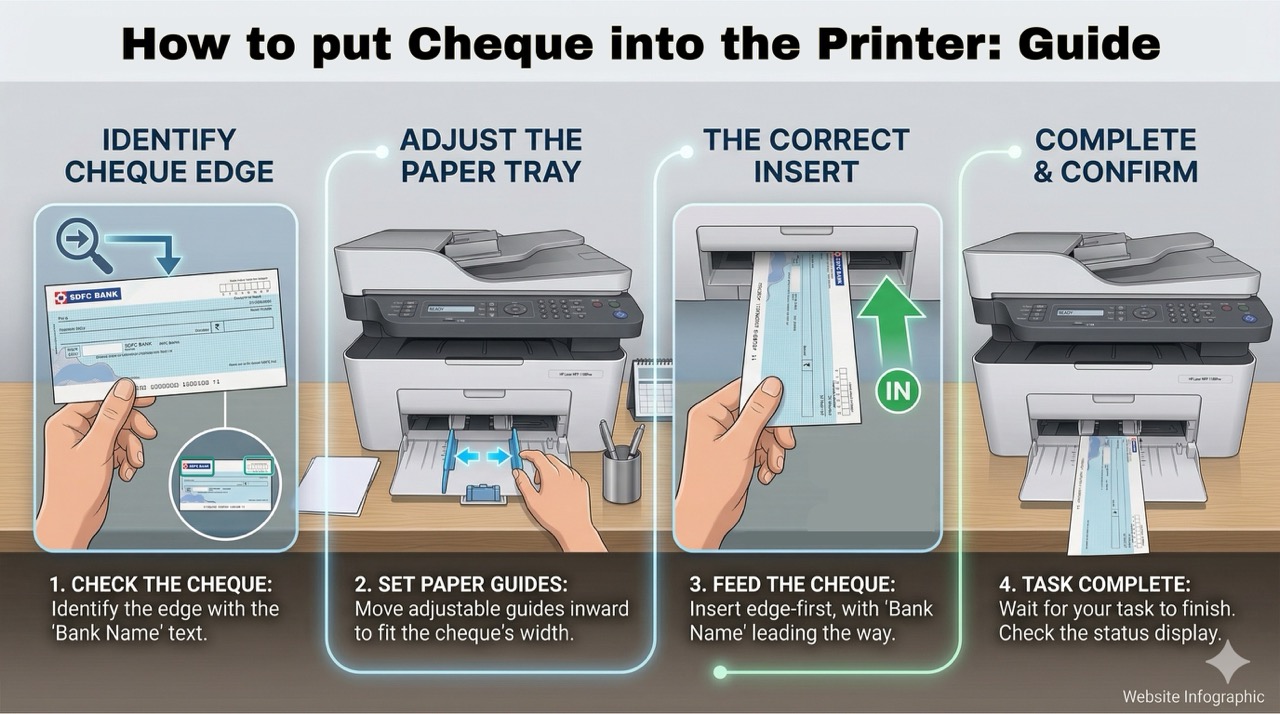
Feed your physical cheque into your printer correctly.
- Insert your cheque with the “Payee Name” side entering the printer first (short edge first, vertically).
Every home printer pulls paper slightly differently. If your print is 2mm off, here is how to fix it:
- Scroll to the Absolute Placement Coordinates (mm) section.
- Find the misaligned field (e.g., “Payee”).
- Adjust Distance From Left or Distance From Bottom by 1–2mm.
- The live preview updates instantly — run one more test print and you are ready.
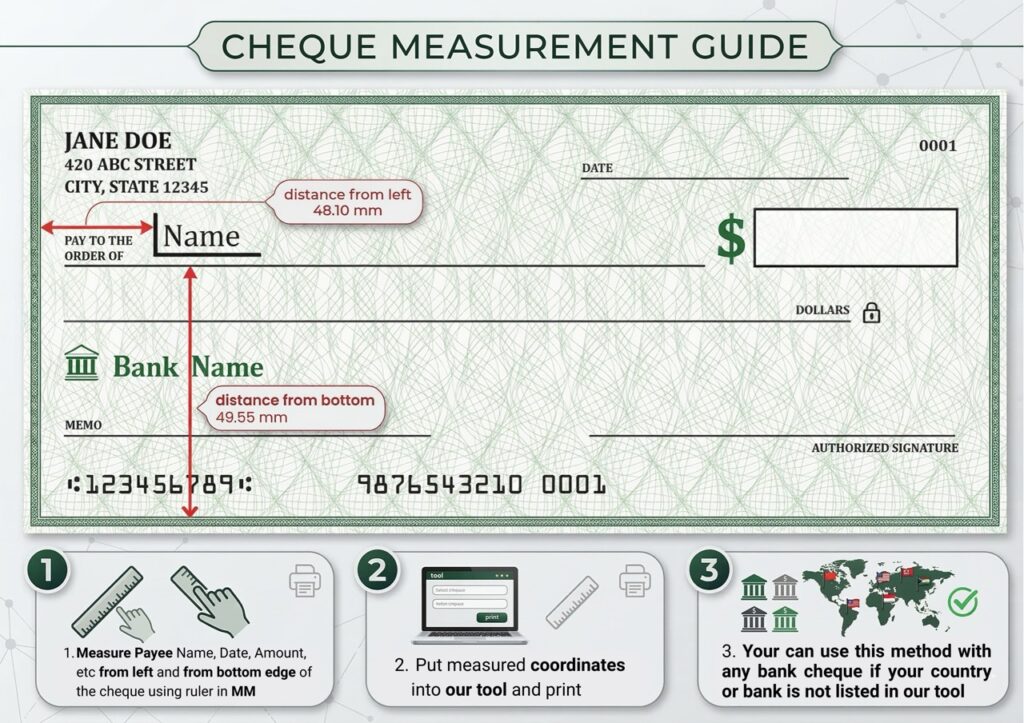
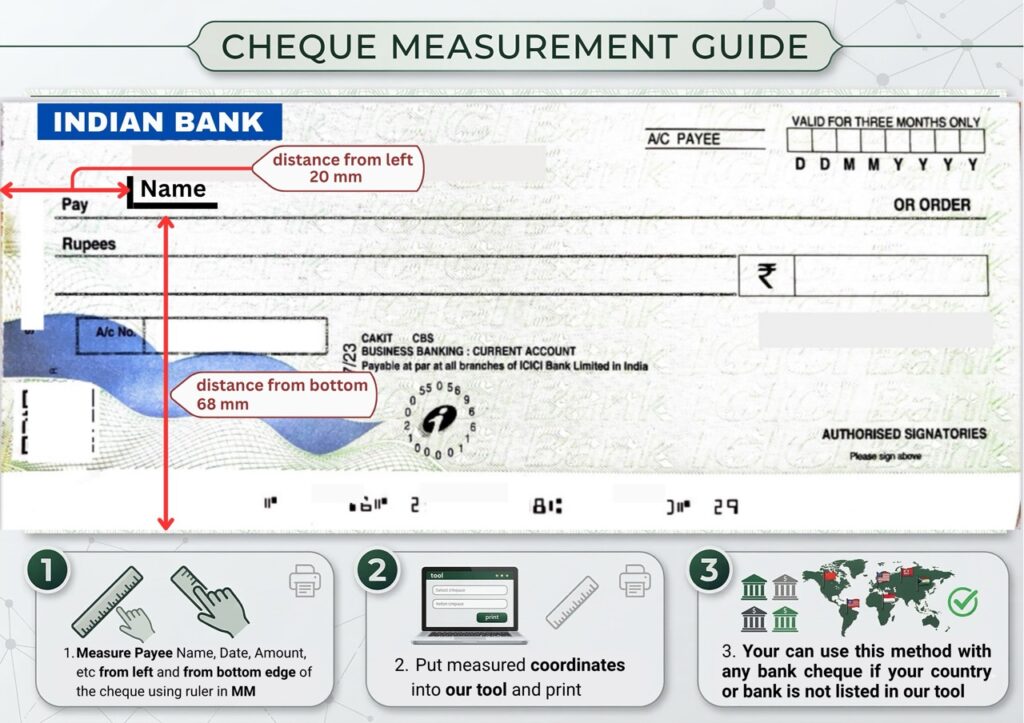
Don’t see your specific bank on the list? No problem.
- Grab a standard school ruler.
- Measure the total size of your cheque (Width × Height in mm).
- Measure how far each field (Payee Name, Date, Amount) is from the left and bottom edges.
- Enter those numbers into the tool — it instantly adapts to print on your cheque. No technical skills required.
Read Our Ultimate Home Print Guide 2026
Frequently Asked Questions
Q: Is it safe to print cheques online here?
A: Yes. chequeprint.cloud is a client-side tool. This means your financial details (payee name, amount) never leave your browser and are never saved on our servers.
Q: What kind of printer do I need?
A: You can use any standard HP printers, Canon, Brother, Epson Laser or Inkjet printers. Laser printers are recommended for better durability.
Q. USA and UK banks also supported?
A. Yes, all USA banks JPMorgan Chase: (Chase), Bank of America: (BofA), Citigroup and UK Banks like Lloyds Bank, Barclays, HSBC etc are supported in this tool. You can also adjust the check dimensions and input fields placement as you like.
Q: Does this work for all Indian banks?
A: Yes. Most banks (SBI, HDFC, ICICI, etc.) follow a standard layout for the “Payee”, “Date”, and “Amount” fields. You can use our Alignment settings to fit any unique cheque format.