Print Qatar Cheques Online
Secure client-side cheque formatting for all major banks in the State of Qatar.

Global Cheque Printer
Required Browser
Physical Size: 203mm x 93mm
CRITICAL: Set Print Scale to "Default" or "100%"
Mac, Windows, iOS, and Android standalone apps are in active development. Take your printing offline soon!
How it works
Ready Your Cheque in four steps
From opening Chrome to holding a perfectly printed Cheque.
- Use Google Chrome on a desktop.
- Select Other Countries (Custom) from the Region dropdown menu.
- Grab a standard millimeter (MM) ruler.
- Measure the exact Width and Height of your Cheque leaf and enter them.
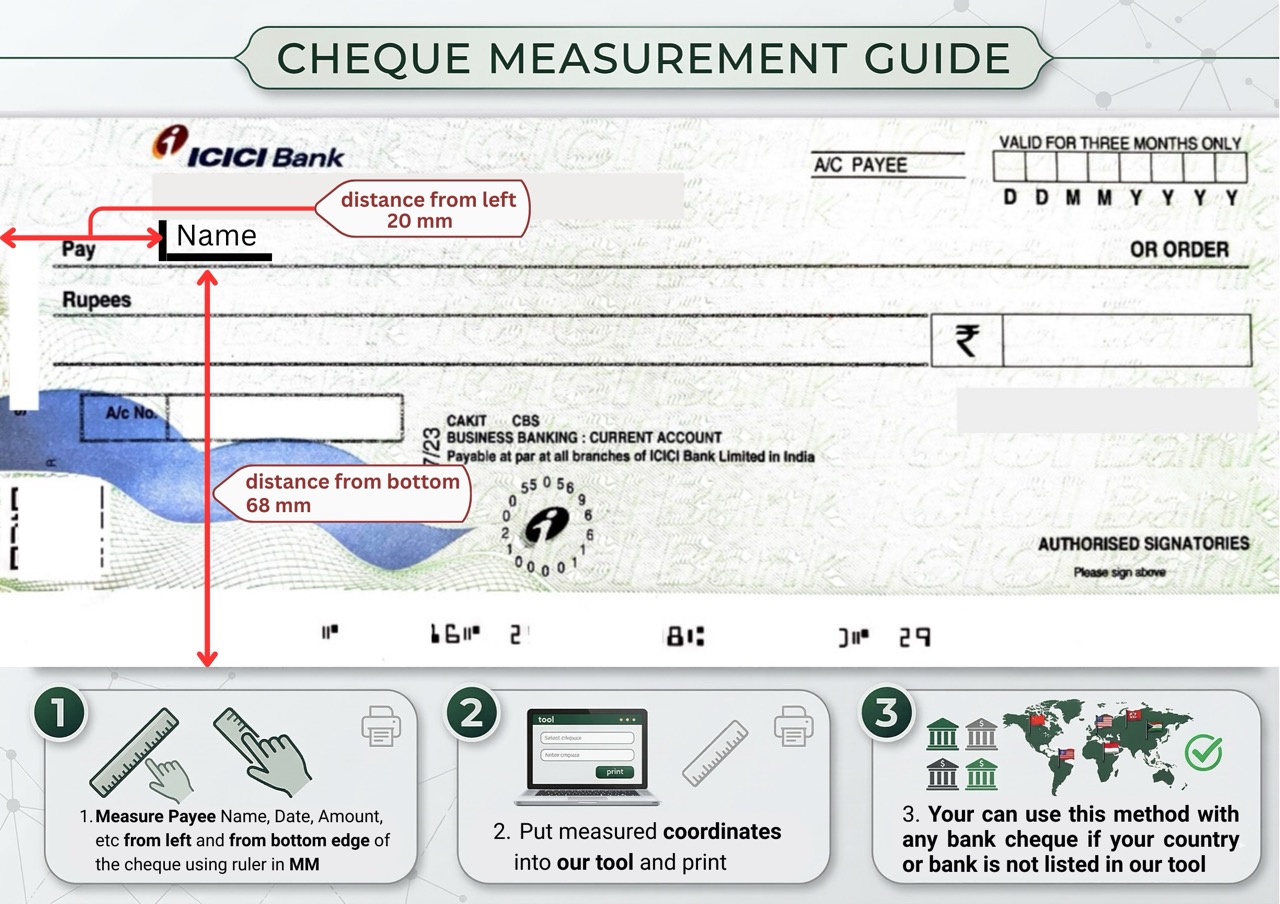
- Measure the distance from the Left and Bottom edges to the Payee, Date, and Amount lines.
- Enter these MM values into the coordinate boxes.
- Type your details. Need help? Read our detailed instructions guide.
- Check the live preview and hit Print!
Why ChequePrint
Key features
Everything built to make cheque printing accurate, private, and effortless.
The tool runs entirely in your browser. No financial data, payee names, or amounts are ever sent to or stored on a server — complete privacy, guaranteed.
A real-time side-by-side preview shows exactly how your text will be positioned on the final physical cheque as you type — no guessing.
Automatically converts amounts into words. Intelligently switches between Indian (Lakhs/Crores) and Western (Millions/Billions) based on your selected region.
Automatically formats the date to match regional standards — DD/MM/YYYY for India, MM/DD/YYYY for the USA — so it always fits perfectly on the cheque.
Includes a searchable global currency database. The correct fractional units — Cents, Paise, Pence, Centavos — are applied to the written amount automatically.
Bank not listed? Use a standard ruler to measure your cheque dimensions and field positions in mm. Enter those numbers and the tool instantly adapts — no technical skills needed.
Measurement guide
How to measure a Qatar Cheque
Use a standard ruler to find each field’s position in mm to ensure perfect alignment.

Measure from the left edge and bottom edge in MM.
Enter the values into the tool’s coordinate fields.
Do a test print on a blank piece of paper first.
FAQ
Questions about Qatar Cheques
Everything you need to know before your first print.
Yes! Our custom dimension tool allows you to measure your QNB or Commercial Bank cheque enter the MM dimensions and align your text instantly.
No. You don’t need expensive enterprise software. Just measure your cheque leaf load it into a standard printer and use our free web tool.
Yes. Because the app uses 100% client-side processing your sensitive corporate payee details are never transmitted over the internet.
You can input English or Arabic text. Use the absolute placement arrow keys to nudge the text exactly where it needs to sit on the physical leaf.