Print Canadian Cheques Online
Perfectly format and print your cheques for RBC TD Scotiabank and all Canadian banks.

Global Cheque Printer
Required Browser
Physical Size: 203mm x 93mm
CRITICAL: Set Print Scale to "Default" or "100%" in print dialogue window
Mac, Windows, iOS, and Android standalone apps are in active development. Take your printing offline soon!
How it works
Ready Your Cheque in four steps
From opening Chrome to holding a perfectly printed Cheque.
- Use Google Chrome on a desktop.
- Select Other Countries (Custom) from the Region dropdown menu.
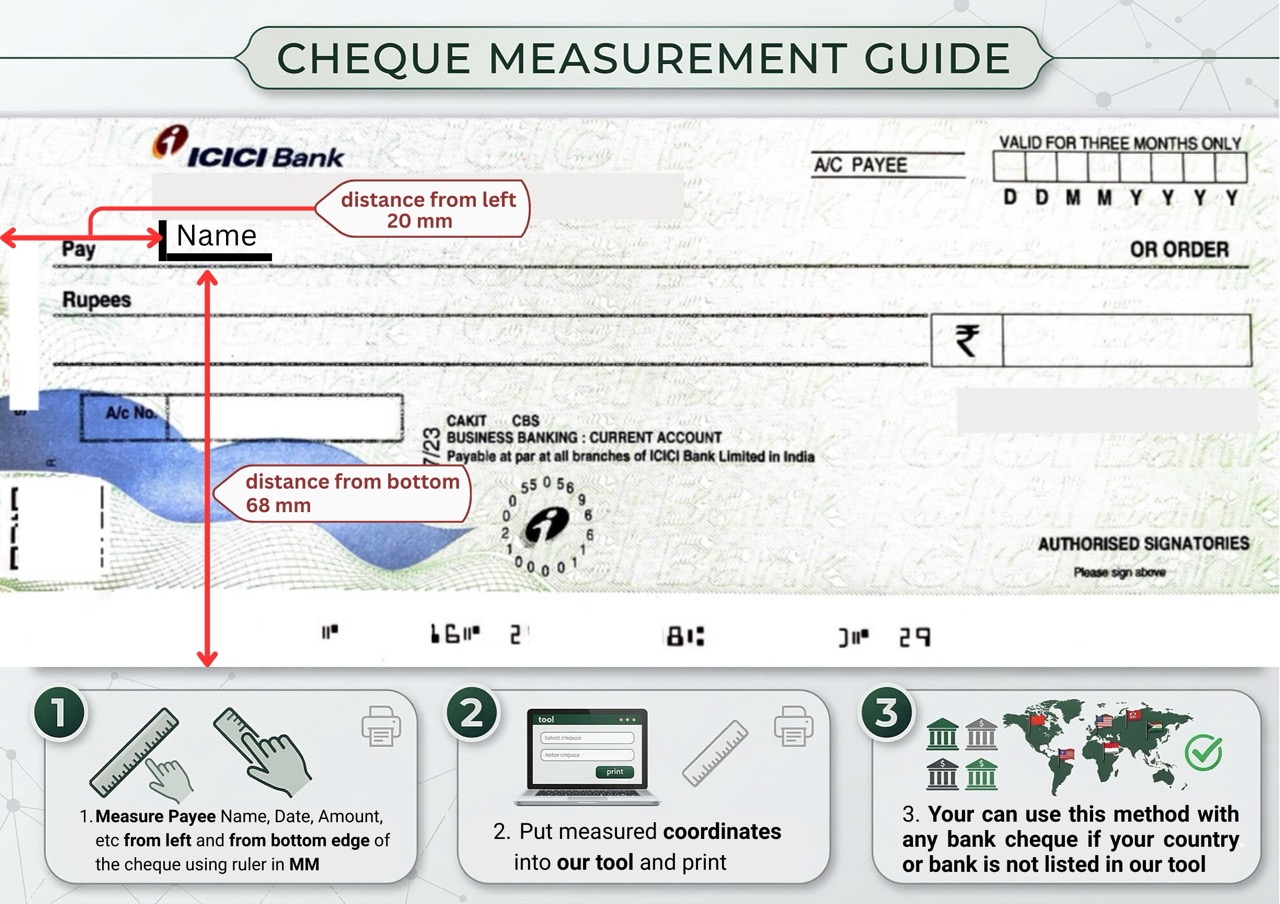
- Grab a standard millimeter (MM) ruler.
- Measure the exact Width and Height of your Cheque leaf and enter them.
- Measure the distance from the Left and Bottom edges to the Payee, Date, and Amount lines.
- Enter these MM values into the coordinate boxes.
- Type your details. Need help? Read our detailed instructions guide.
- Check the live preview and hit Print!
Why ChequePrint
Key features
Everything built to make cheque printing accurate, private, and effortless.
Payee names, amounts and dates are processed on your device when you print. We only keep an anonymous counter for the free daily limit. Pro cloud saving is optional.
A real-time side-by-side preview shows exactly how your text will be positioned on the final physical cheque as you type — no guessing.
Automatically converts amounts into words. Intelligently switches between Indian (Lakhs/Crores) and Western (Millions/Billions) based on your selected region.
Automatically formats the date to match regional standards — DD/MM/YYYY for India, MM/DD/YYYY for the USA — so it always fits perfectly on the cheque.
Includes a searchable global currency database. The correct fractional units — Cents, Paise, Pence, Centavos — are applied to the written amount automatically.
Bank not listed? Use a standard ruler to measure your cheque dimensions and field positions in mm. Enter those numbers and the tool instantly adapts — no technical skills needed.
Measurement guide
How to measure a Canada Cheque
Use a standard ruler to find each field’s position in mm to ensure perfect alignment.

Measure from the left edge and bottom edge in MM.
Enter the values into the tool’s coordinate fields.
Do a test print on a blank piece of paper first.
FAQ
Questions about Canada Cheques
Everything you need to know before your first print.
Yes. Canadian cheques follow the strict CPA Standard 006 guidelines. Our tool has Canada-specific offsets built in to ensure your text hits the lines perfectly.
Absolutely. Our tool runs 100% in your browser. Your payee and amount data never leaves your computer making it perfectly secure for business use.
Yes the CPA-006 standard applies to all major Canadian banks meaning this tool works perfectly for RBC TD Scotiabank BMO and CIBC.
If you are printing on pre-printed bank stock that already has the magnetic numbers at the bottom standard printer ink or toner is perfectly fine.