Fill the form, see a live preview, and print directly onto your Lloyds Bank cheque leaf.
Desktop Required
This cheque printing tool requires a larger screen to operate.
Open in Google Chrome on a desktop or laptop
Mobile Apps Launching Soon!
Our Android & iOS apps are in active development. Join the waitlist to get notified when they launch.
You're on the list!
We'll notify you when the app launches.
Global Cheque Printer
Required Browser
Use Google Chrome Browser for desktop for best results.
✨ More banks soon!
Physical Size: 203mm x 93mm
Print?
🚫 Date print is not available for "Other Bank". Print other fields only.
Absolute Placement Coordinates (mm)
Field
Dist. From Left
Dist. From Bottom
Payee
Amt Words
Amt Digits
Date
Memo
A/C Payee
Date Gap
Checking print access…
CRITICAL: Set Print Scale to "Default" or "100%" in print dialogue window
🚀Native Apps
COMING SOON
Mac, Windows, iOS, and Android standalone apps are in active development. Take your printing offline soon!
You're on the list! We'll notify you at launch.
How to Measure Your Cheque
Live Cheque Preview
History Ledger
View, search, filter, and reprint past cheques
to
Payee Directory
Save and manage your frequent payees
1 Selected
Saved Templates
Manage your custom cheque layouts and coordinates
Settings & Account
Manage your subscription, account details, and settings
Account Status
U
User
Signed in
Free
Subscription
Checking subscription…
Verify your email
We've sent a verification email to .
Please verify your email before continuing.
Sign In
Sign in to use your Pro subscription across devices.
Create Account
Create an account to manage your subscription and Pro data.
Reset Password
Enter your email and we'll send secure password-reset instructions.
or use email
Don't have an account?
Already have an account?
Remember your password?
PRO
You’ve used your 5 free prints
Upgrade to Pro for unlimited cheque printing and access to all Pro features.
How it works
Ready Your Cheque in four steps
From opening Chrome to holding a perfectly printed cheque.
1
Step 01
Use the Right Browser
Use Google Chrome on a desktop.
Avoid Safari, Firefox, or Edge.
2
Step 02
Configure Settings
Select UK, then enter your Lloyds Bank cheque Width & Height in mm.
Double-check dimensions if using custom mode.
3
Step 03
Enter Details
Type amount — words generate automatically.
Long amounts wrap to a second line.
4
Step 04
Fine-Tune & Print
Use Absolute Placement to fix misaligned fields.
Preview updates instantly — click Print!
Why ChequePrint
Key features
Everything built to make cheque printing accurate, private, and effortless.
Your Details Stay in Your Browser
Payee names, amounts and dates are processed on your device when you print. We only keep an anonymous counter for the free daily limit. Pro cloud saving is optional.
Live Preview
Real-time side-by-side preview shows exactly how text will align on your leaf.
Smart Engine
Automatically converts numbers into words, applying correct fractional units.
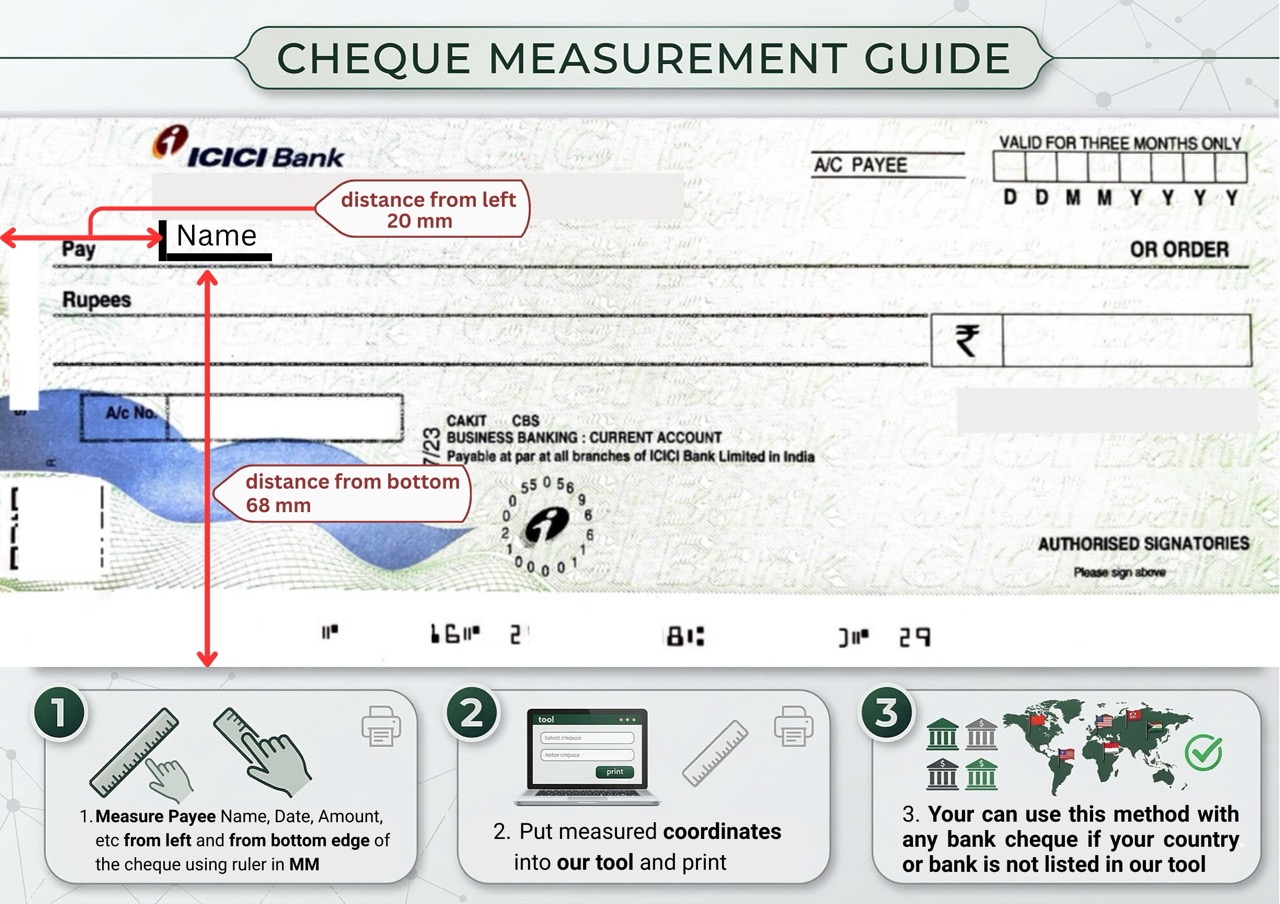
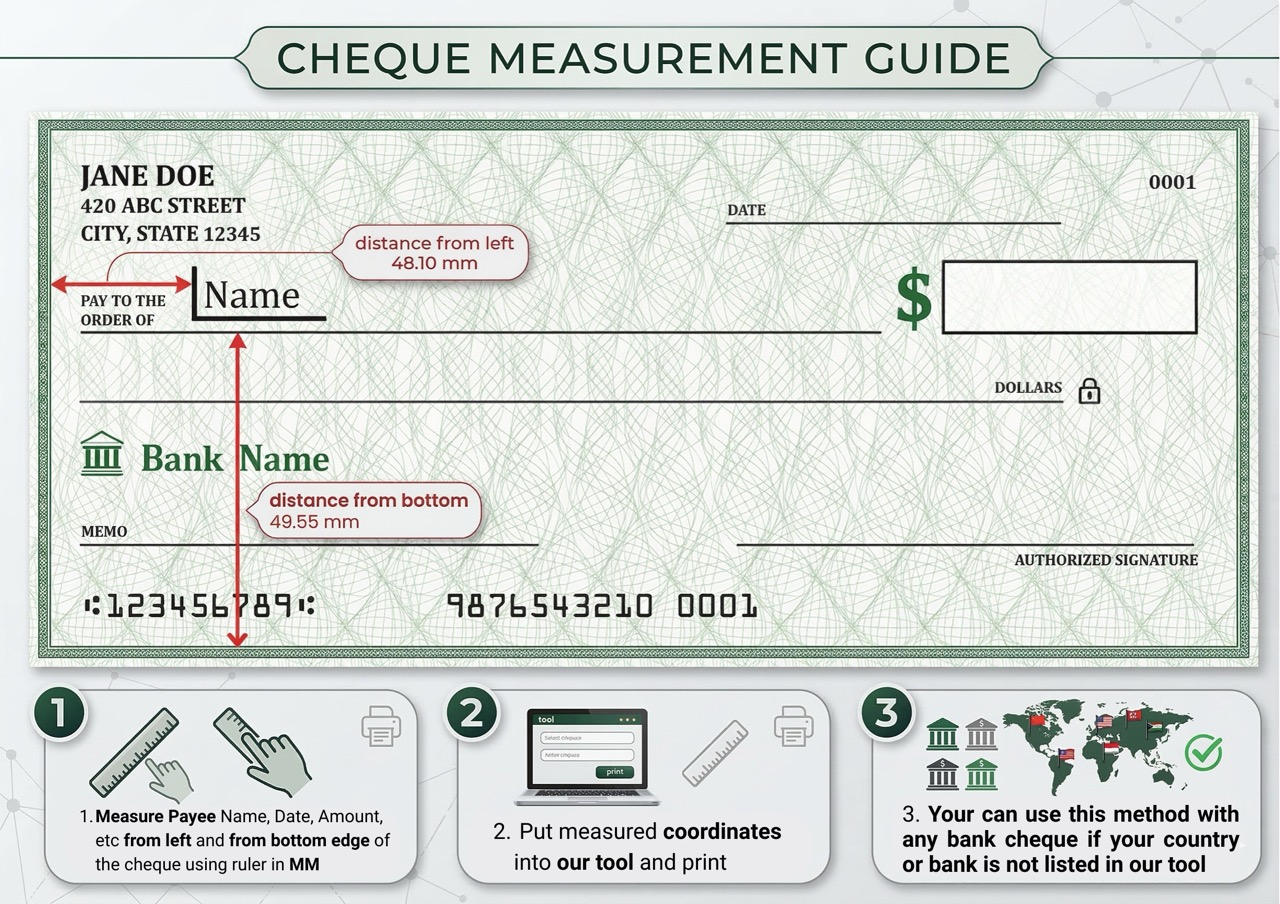
Measurement guide
How to measure for Lloyds Bank
Use a standard ruler to find each field’s position in mm to ensure perfect alignment.
1
Measure with ruler
Measure from the left edge and bottom edge in MM.
2
Enter coordinates
Enter the values into the tool’s coordinate fields.
3
Verify Alignment
Do a test print on a blank piece of paper first.
Pro tip for Lloyds Bank: Lloyds Bank cheques follow standard C&CCC layouts. Measure carefully from the bottom and left edges.
FAQ
Questions about Lloyds Bank
Everything you need to know before your first print.
Is it safe to type my Lloyds details here?
Yes. ChequePrint.Cloud is a client-side tool. Your Lloyds Bank details never leave your browser.
What printer do I need for Lloyds cheques?
Any standard inkjet or laser printer works perfectly for Lloyds cheques.
Does this support standard formats?
Yes. Our tool gives you flexibility to adjust field placement and change dimensions.
Do I need to download software?
No download needed. Use our cloud-based tool directly in your browser.